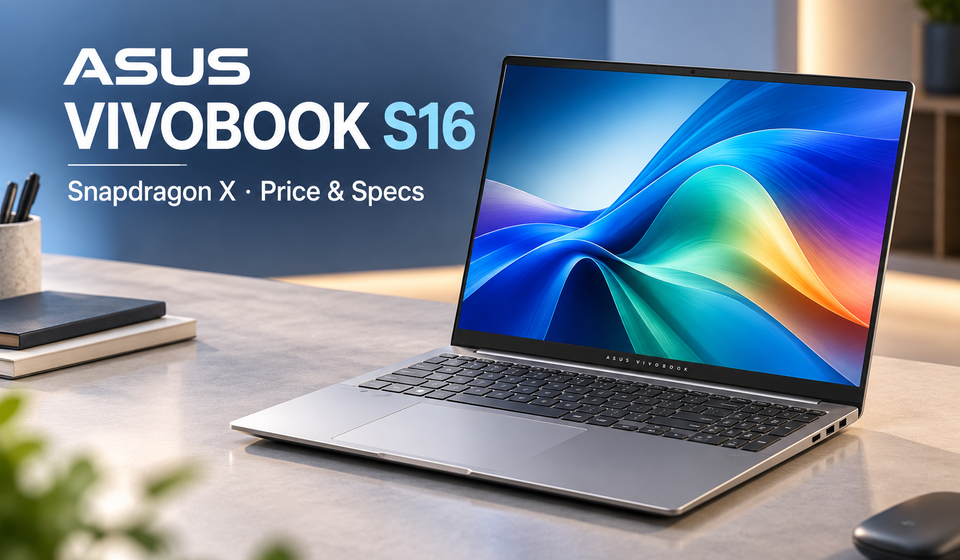
ASUS Vivobook S16 Snapdragon X: Price in India, Specifications and Features
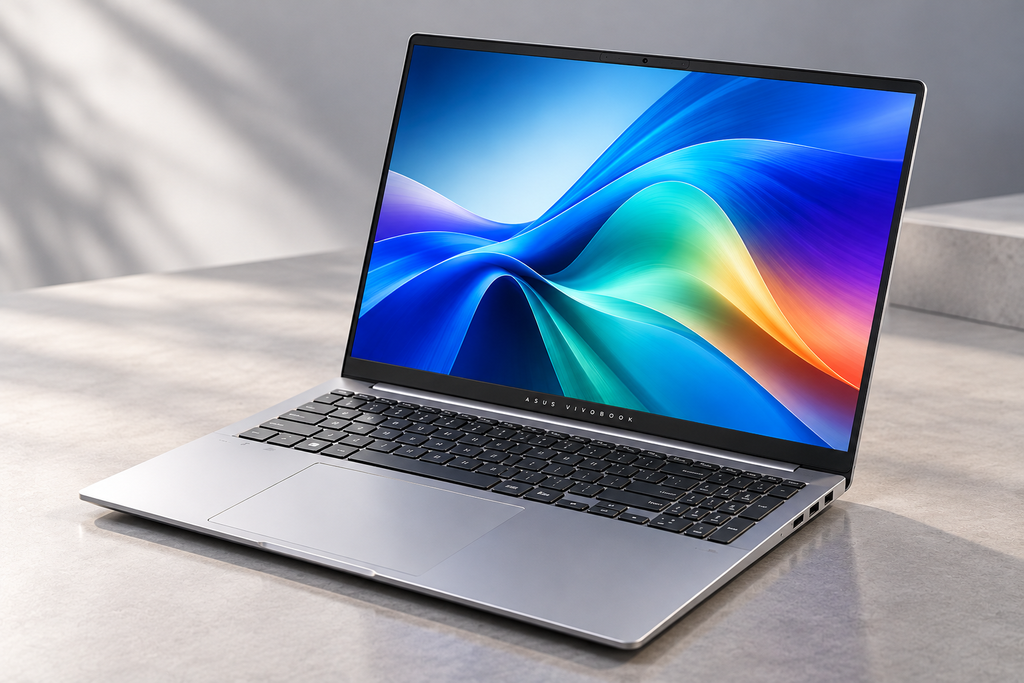
The ASUS Vivobook S16 Snapdragon X S5608QA is a 16-inch Windows laptop powered by Qualcomm’s Snapdragon X processor. It combines a large display, an integrated AI processor, a slim design and a selection of ports for everyday productivity. It is designed for people who want a laptop for work, study, web browsing, video calls and entertainment without necessarily moving to a more expensive high-performance machine.
However, there is an important detail buyers should understand before purchasing. The ASUS Vivobook S16 Snapdragon X S5608QA is available in different hardware configurations, including OLED and IPS display options. These versions do not offer the same display experience, and specifications can vary by model code and retailer.
ASUS announced the Snapdragon-powered model for the Indian market in September 2026, with availability expected from October. An online retailer listing has shown a price of ₹80,990 for one configuration, but that figure should not be treated as a confirmed official nationwide launch price. Here is a closer look at the laptop’s specifications, features, limitations and buying considerations.
ASUS Vivobook S16 Snapdragon X Price in India and Availability
The ASUS Vivobook S16 Snapdragon X S5608QA was included in the company’s 2026 Vivobook lineup announced for India. ASUS initially indicated that the Snapdragon-powered S5608QA would become available around the second week of October, with pricing to be announced closer to availability.
That expected launch window has passed. However, buyers should distinguish between an announced launch schedule and confirmed stock at a particular store. Availability, delivery dates, colour options and configuration choices can differ between ASUS’s own store and third-party retailers.
An online listing for the ASUS Vivobook S16 Snapdragon X S5608QA-U3310WS, described with 8GB RAM and a 512GB SSD, has shown a price of ₹80,990. This is a retailer-listed price rather than a verified official nationwide launch price. It can change according to stock, promotions, seller pricing and location.
There is another reason to check the listing carefully. ASUS’s official global specifications include an 8GB RAM and 256GB SSD configuration with an IPS-level display, as well as a 16GB RAM and 512GB SSD configuration with an OLED display. A retailer listing advertising 8GB RAM and a 512GB SSD does not exactly match those two listed combinations.
Before buying, confirm the full model number, RAM, SSD capacity, display type, warranty and final checkout price. Do not assume that every listing carrying the name Vivobook S16 has identical hardware.
ASUS Vivobook S16 Snapdragon X S5608QA: Specifications
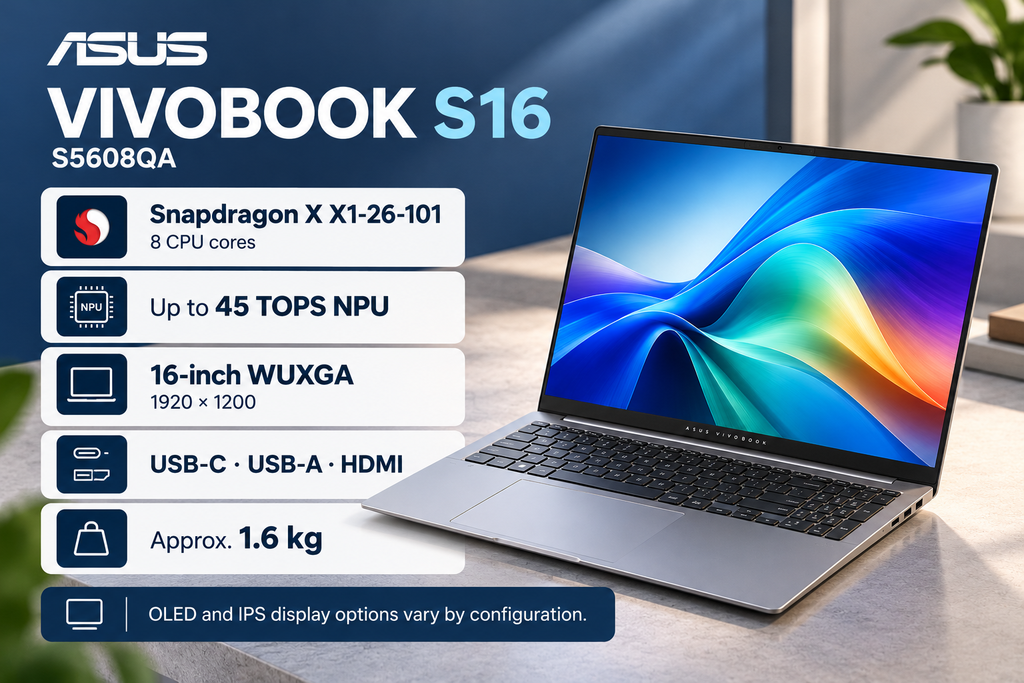
The laptop uses Qualcomm’s Snapdragon X X1-26-101 processor. According to ASUS’s published specifications, this chip has eight CPU cores, eight threads, a maximum listed frequency of 2.97GHz and a 30MB cache. Graphics are handled by an integrated Qualcomm Adreno GPU.
The laptop also includes a Qualcomm Hexagon neural processing unit, or NPU, rated at up to 45 TOPS. This hardware is designed to accelerate supported AI tasks, although actual performance depends on the application and workload.
The main specifications published for the S5608QA include:
| Specification | Details |
|---|---|
| Model | ASUS Vivobook S16 Snapdragon X S5608QA |
| Processor | Qualcomm Snapdragon X X1-26-101 |
| CPU cores / threads | 8 cores / 8 threads |
| Maximum CPU frequency | Up to 2.97GHz |
| CPU cache | 30MB |
| Graphics | Integrated Qualcomm Adreno GPU |
| AI processor (NPU) | Qualcomm Hexagon NPU, up to 45 TOPS |
| Display size | 16 inches |
| Display resolution | WUXGA (1920 × 1200 pixels) |
| Aspect ratio | 16:10 |
| Refresh rate | 60Hz |
| OLED display option | 300 nits, 100% DCI-P3 colour gamut |
| IPS display option | 300 nits, 45% NTSC colour gamut |
| RAM options | 8GB / 16GB LPDDR5X, depending on configuration |
| RAM upgradeability | Onboard memory; not listed as user-upgradable |
| Storage options | 256GB / 512GB SSD, depending on configuration |
| Storage expansion | One M.2 2280 slot listed |
| USB-C ports | 2 × USB-C 3.2 Gen 2 with power delivery and display output |
| USB-A ports | 2 × USB-A 3.2 Gen 1 |
| Video output | HDMI |
| Audio | 3.5mm audio jack |
| Wireless connectivity | Wi-Fi 6E |
| Operating system | Windows 11 Home |
| Battery life claim | Up to 30 hours under ASUS’s specified video-playback test conditions |
| Weight | Approximately 1.6kg |
| Available colours | Matte Gray and Light Blue, depending on market and configuration |
| India price | ₹80,990 listed by a retailer for one 8GB/512GB configuration; not confirmed as the official nationwide launch price |
| Availability | Announced for India; current stock and configuration should be checked with the seller |
Source: ASUS’s official product and technical specification pages, supplemented by retailer listings for India pricing.
Important: The OLED and IPS displays are different configurations. Before publishing the specifications or buying the laptop, verify the exact Indian SKU, display type, RAM, storage and current price.
These details describe the published model family, not a guarantee that every specification appears in every unit sold in India. Check the product’s full SKU before making a purchase.
Snapdragon X Processor: What Does It Mean for Everyday Performance?
The Snapdragon X platform is designed to combine responsive everyday computing with power efficiency. Its eight-core processor can handle common activities such as opening documents, working with spreadsheets, browsing websites, attending online meetings and using several everyday applications.
For a student, that could mean keeping research tabs open while preparing assignments. For an office worker, it could mean switching between email, spreadsheets, browser-based tools and video calls. For someone working remotely, the large display and integrated graphics may be useful for managing multiple windows and everyday communication apps.
However, the processor name alone does not tell the whole performance story. Speed also depends on the laptop’s memory, cooling, software optimisation and the complexity of the task. The available 8GB configuration may be adequate for lighter use, but users who regularly work with many browser tabs, large spreadsheets or several demanding applications may benefit from choosing a higher-memory version if one is available.
The integrated Adreno GPU is intended for everyday graphics and supported accelerated workloads. This laptop should not automatically be treated as a replacement for a dedicated-GPU machine used for demanding 3D rendering, intensive video effects or modern games. Those workloads need to be evaluated through independent testing of the specific laptop and application.
AI Features and the 45 TOPS NPU
One of the notable specifications is the Qualcomm Hexagon NPU, rated at up to 45 trillion operations per second, or TOPS. An NPU is a specialised processor designed to accelerate certain artificial intelligence tasks more efficiently than relying entirely on the CPU.
Depending on software support, an NPU can help with tasks such as background effects during video calls, supported creative tools and local AI processing. Windows and third-party applications may also use AI hardware for specific features.
Nevertheless, a 45 TOPS rating does not mean every AI feature will run locally or work faster automatically. Some applications depend on cloud services, some require particular software versions, and others may not support the laptop’s processor architecture. Buyers should check whether the AI tools they want to use are supported on their intended Windows setup.
The practical question is not simply how many TOPS the chip delivers. It is whether the applications you use every day can take advantage of the hardware.
16-Inch Display: OLED vs IPS
The 16-inch display is one of the laptop’s main attractions. Its 1920 × 1200 resolution provides a 16:10 aspect ratio, which gives users more vertical screen space than a conventional 16:9 display at a comparable width.
That extra space can be useful when reading long documents, editing spreadsheets, browsing websites or keeping two windows open side by side. A larger display can also make films, presentations and online learning more comfortable to view.
The display technology is particularly important, however, because ASUS lists OLED and IPS-level versions.
OLED configuration
The published OLED specification includes 100% DCI-P3 colour coverage and a rated brightness of 300 nits. OLED panels can produce deep blacks and strong contrast because individual pixels generate their own light. This can make films, photos and compatible creative content look more vivid.
For users who regularly view photos or video, the OLED version may be the more appealing choice. Its wider colour coverage is also a useful specification for colour-rich content, although professional colour work still benefits from checking calibration and independent display measurements.
IPS-level configuration
The listed IPS-level panel has a rated brightness of 300 nits and 45% NTSC colour coverage. It may be suitable for everyday productivity, online classes, office applications and general browsing, but it should not be considered visually equivalent to the OLED option.
Neither panel’s rated brightness guarantees comfortable visibility in every environment. Bright sunlight, reflections and viewing conditions can affect usability.
Buying tip: Verify the exact display type on the retailer’s specifications page or the laptop’s full model code. Do not assume that an ASUS Vivobook S16 Snapdragon X S5608QA listing includes OLED simply because OLED is available elsewhere in the Vivobook S16 family.
RAM and Storage: Choose Carefully Before Buying
ASUS Vivobook S16 Snapdragon X lists 8GB and 16GB LPDDR5X memory configurations for this model family. The listed memory is onboard, so buyers should not assume that RAM can be upgraded after purchase.
For lighter workloads such as web browsing, documents, online classes and basic office applications, 8GB may be enough. But memory demand increases when users keep numerous browser tabs open, switch between several applications, edit larger files or run demanding development and creative tools.
If you expect to keep a laptop for several years, a 16GB configuration is worth considering when available and within budget. It provides more headroom for multitasking. Confirm the actual RAM configuration before ordering, particularly when a retailer listing has a different combination of memory and storage from the official specification options.
Storage is another consideration. ASUS lists SSD options of 256GB and 512GB, depending on configuration. A 256GB drive can fill up quickly if you store many videos, large applications or offline files. A 512GB drive gives more room for everyday files and applications.
The specifications list one M.2 2280 storage slot. However, buyers should confirm the exact configuration and upgrade procedure with ASUS before assuming that storage expansion will be straightforward or covered by warranty.
Ports and Connectivity
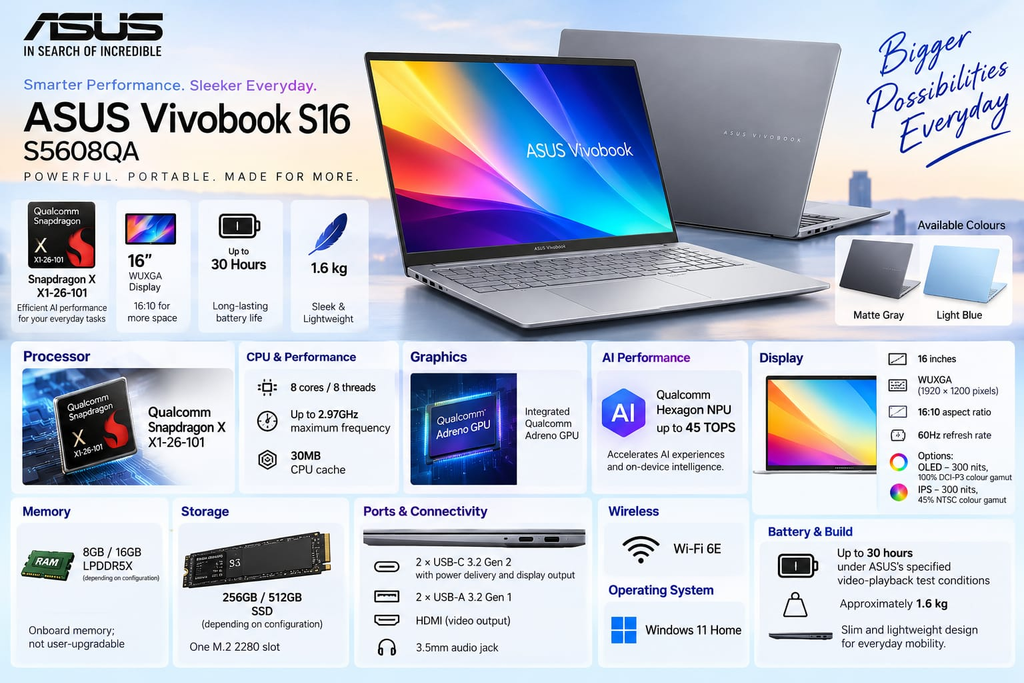
The ASUS Vivobook S16 Snapdragon X includes a useful selection of physical connections for a modern everyday laptop. ASUS lists two USB-C 3.2 Gen 2 ports supporting power delivery and display output, two USB-A 3.2 Gen 1 ports, an HDMI port and a 3.5mm audio jack.
This mix can be helpful if you use traditional USB accessories such as a mouse, flash drive or other peripherals alongside newer USB-C devices. The HDMI connection can also be useful when connecting the laptop to a compatible external monitor or presentation display.
The USB-C ports support display output and power delivery, but buyers should consult the official specifications and relevant accessory documentation for their particular charging and monitor setup. Not every cable, dock or peripheral necessarily offers the same capabilities.
Wireless connectivity includes Wi-Fi 6E. To benefit from the 6GHz band, users need a compatible router and suitable network conditions. Actual wireless performance will depend on the router, signal strength, network congestion and internet connection.
Although the ASUS Vivobook S16 Snapdragon X has a large 16-inch display, ASUS lists its weight at approximately 1.6kg. That makes it reasonably portable for a laptop of this screen size, though it remains larger than most 13-inch and 14-inch alternatives.
The larger chassis gives users more screen space for work and study, but it also takes up more room in a backpack and on a small desk. Anyone who travels frequently should consider the combined weight of the laptop, charger and accessories rather than comparing the laptop alone.
ASUS Vivobook S16 Snapdragon X lists Matte Gray and Light Blue colour options for the model family, with availability depending on the market and configuration. Buyers should check the colour actually offered by the seller rather than assuming both options are available locally.
Battery Life: Understanding ASUS’s Up-to-30-Hour Claim
ASUS advertises up to 30 hours of battery life for the ASUS Vivobook S16 Snapdragon X S5608QA. This is a manufacturer claim based on a specific video-playback test rather than a guarantee of normal daily battery life.
The published test conditions include Wi-Fi and keyboard backlighting being disabled and the display brightness set to 150 nits, alongside other specified settings. Real-world use can be more demanding. Video calls, high screen brightness, multiple browser tabs, software updates, AI workloads and external devices can all affect battery consumption.
A user who mainly reads documents and browses websites may experience a different result from someone who spends the day on video calls or uses demanding applications. Room temperature, battery condition and background processes can also affect the result.
The Snapdragon platform is designed with power efficiency in mind, but independent testing is needed to understand how long a particular configuration lasts under a typical workday. Treat the 30-hour figure as a best-case manufacturer test result, not an everyday promise.
Windows on Arm: A Compatibility Check Before Buying
The ASUS Vivobook S16 Snapdragon X S5608QA uses a Snapdragon processor, which means it belongs to the Windows-on-Arm laptop category. Many popular Windows applications support Arm devices either natively or through Windows compatibility features, but support is not universal.
This is especially important for people who depend on specialist business software, older applications, particular hardware drivers, niche creative tools or games with specific compatibility requirements. Some applications may run well, others may rely on emulation, and some may not work as expected.
Before purchasing, make a list of the applications you cannot work without. Check the software developer’s official support documentation for Windows on Arm and confirm that any required printers, scanners, audio interfaces or other peripherals have compatible drivers.
This check can be more important than the processor’s headline specifications. A laptop that performs well in general use may still be unsuitable if it cannot run a critical application or connect to essential equipment.
Who Should Consider the ASUS Vivobook S16 Snapdragon X?
The laptop could be a good fit for students who need a large display for research, writing, presentations and online classes. Its 16:10 screen offers useful vertical space, while the selection of ports can help connect everyday accessories.
Office users and remote workers may also appreciate the large screen, integrated graphics, wireless connectivity and Snapdragon X platform for supported productivity workloads. People who spend a lot of time reading, writing or managing browser-based tools may find the screen size particularly useful.
The OLED version may appeal to users who watch films or value deeper contrast and wider colour coverage. However, the IPS configuration may be sufficient for buyers whose main priorities are everyday productivity and price.
The laptop is less straightforward for users who need specialised software, guaranteed compatibility with older tools, high-end gaming performance or demanding graphics workflows. Those buyers should check application support and compare independent performance tests before deciding.
ASUS Vivobook S16 Snapdragon X: Pros and Cons
Pros
- Large 16-inch WUXGA display with a productivity-friendly 16:10 aspect ratio.
- Snapdragon X processor with eight CPU cores.
- Integrated NPU rated at up to 45 TOPS for supported AI workloads.
- OLED option with published 100% DCI-P3 colour coverage.
- Useful combination of USB-C, USB-A, HDMI and audio connectivity.
- Approximately 1.6kg listed weight for a 16-inch laptop.
Cons and limitations
- OLED and IPS configurations offer different display experiences.
- Onboard RAM should be selected carefully because it is not listed as user-upgradable.
- Retailer prices and configuration details may differ.
- Windows-on-Arm compatibility should be checked for specialist applications.
- ASUS Vivobook S16 Snapdragon X maximum battery-life claim comes from controlled test conditions and may not reflect daily use.
- A dedicated GPU may be preferable for demanding 3D, gaming and graphics workloads.
ASUS Vivobook S16 Snapdragon X vs Other Laptops: What Should You Compare?
Before choosing the ASUS Vivobook S16 Snapdragon X, compare it with laptops in a similar price range based on the configuration you can actually buy. A headline price alone is not enough.
Start with the display. An OLED model and an IPS model may deliver noticeably different viewing experiences, even if their names are almost identical. Next, compare RAM and storage, since a higher-memory configuration may be more useful over several years.
Processor architecture is another key difference. A Snapdragon laptop can be an attractive choice for supported applications and efficiency-focused use, while a laptop with an Intel or AMD processor may be a better fit for certain software, drivers or specialist workflows. Neither platform is automatically the better choice for every buyer.
Finally, compare real-world battery tests, keyboard comfort, webcam quality, repair and warranty support, and the return policy. If independent reviews of the exact ASUS Vivobook S16 Snapdragon X S5608QA configuration are unavailable, avoid assuming that results from another Vivobook model apply to it.
Should You Buy the ASUS Vivobook S16 Snapdragon X?
The ASUS Vivobook S16 Snapdragon X S5608QA is worth considering if you want a large-screen Windows laptop for study, office work, browsing, media consumption and supported productivity applications. Its Snapdragon X processor, integrated NPU, 16:10 display and range of ports make it a relevant option for everyday computing.
The decision becomes more complicated when choosing between configurations. An OLED screen can offer better contrast and wider colour coverage, while the IPS version may meet basic productivity needs. RAM and storage also matter: buyers who multitask heavily should consider whether 8GB will be sufficient for their workload over the next few years.
The price needs equal attention. The ₹80,990 figure seen in an online listing is useful as a retailer price reference, but it should not be presented as a confirmed official ASUS India launch price. Check the final checkout amount, exact SKU, display type, RAM, SSD, seller reputation and warranty before placing an order.
Buying verdict: Consider the ASUS Vivobook S16 Snapdragon X if its verified configuration suits your needs and your essential applications support Windows on Arm. Do not buy it solely because of the AI specification or the maximum battery claim. The best choice is the configuration that offers the right display, memory, storage, compatibility and price for your actual daily use.
Conclusion
The ASUS Vivobook S16 Snapdragon X S5608QA brings Snapdragon X processing, a 16-inch display, integrated AI hardware and a useful range of ports to the Windows laptop market. Its main strengths are the large productivity-friendly screen and a platform designed for supported everyday workloads.
The important caveats are the different OLED and IPS configurations, onboard memory, Windows-on-Arm compatibility and uncertainty around a single official India price. Verify the full model code and live seller details before purchasing. That will give you a more reliable basis for deciding whether the ASUS Vivobook S16 Snapdragon X is the right laptop for your needs.
Frequently Asked Questions
1. What is the ASUS Vivobook S16 Snapdragon X price in India?
A retailer listing has shown ₹80,990 for the ASUS Vivobook S16 Snapdragon X S5608QA-U3310WS configuration described with 8GB RAM and a 512GB SSD. This is a seller-specific listing, not a verified official nationwide launch price. Check the current price and exact specifications before buying.
2. Which processor does the ASUS Vivobook S16 Snapdragon X S5608QA use?
It uses the Qualcomm Snapdragon X X1-26-101 processor with eight CPU cores, eight threads and a maximum listed frequency of 2.97GHz.
3. Does the ASUS Vivobook S16 Snapdragon X have an OLED display?
Some configurations have a 16-inch WUXGA OLED display with 100% DCI-P3 colour coverage. ASUS also lists an IPS-level version, so buyers should confirm the display type associated with the exact model code.
4. How much RAM does the ASUS Vivobook S16 Snapdragon X offer?
ASUS lists 8GB and 16GB LPDDR5X memory options for the ASUS Vivobook S16 Snapdragon X S5608QA family. The memory is onboard, so buyers should choose the appropriate configuration before purchasing rather than assuming it can be upgraded later.
5. Can the ASUS Vivobook S16 Snapdragon X storage be upgraded?
ASUS Vivobook S16 Snapdragon X lists one M.2 2280 storage slot. The exact configuration and supported upgrade options should be confirmed with ASUS or an authorised service provider before making changes.
6. How long does the battery last?
ASUS Vivobook S16 Snapdragon X advertises up to 30 hours under specified video-playback test conditions. Everyday battery life depends on brightness, workload, wireless use, background processes and other factors.
7. Is the ASUS Vivobook S16 Snapdragon X suitable for students?
It could suit students who need a large screen for assignments, research, documents, online learning and presentations. Students who rely on specialist engineering, design or examination software should check Windows-on-Arm compatibility first.
8. Is the ASUS Vivobook S16 Snapdragon X good for video editing?
It may be suitable for supported, relatively light editing workflows, but suitability depends on the editing software, codecs, effects and project size. Users who depend on demanding effects or GPU-intensive work should check application support and independent tests of the exact configuration.
9. Can it run all Windows applications?
No laptop should be assumed to run every Windows application. Many applications support Windows on Arm, but some specialist programs, older utilities, drivers and games may have limitations. Check compatibility for the software and peripherals you rely on.
10. Is the Snapdragon X model better than an Intel or AMD laptop?
That depends on your workload. The Snapdragon X model may appeal to buyers prioritising supported everyday applications and efficiency, while certain Intel or AMD laptops may suit specific software, gaming or graphics requirements better. Compare exact configurations and independent tests rather than processor names alone.
11. Does the laptop support Wi-Fi 6E?
Yes, Wi-Fi 6E is listed in the published specifications. Access to the 6GHz band requires a compatible router and suitable network conditions.
12. Should you buy the 8GB or 16GB version?
The 8GB model may be adequate for lighter everyday work. The 16GB option provides more memory headroom for multitasking and heavier workloads, if available at an acceptable price. Since the memory is onboard, make the decision carefully before buying.
Recommendations :
OPPO 22.5W Power Bank: 7 Powerful Features
Acer Iconia Tab 11 5G and Tab 12 5G Launched in Inida
Lava Aura Curve 5G Launched in India: 7 Key Features